What is this card
Xilinx FPGA video IP
        ↓
Alveo U30: high-density transcode card on FPGA, sold via VARs/OEMs as an appliance part
        ↓
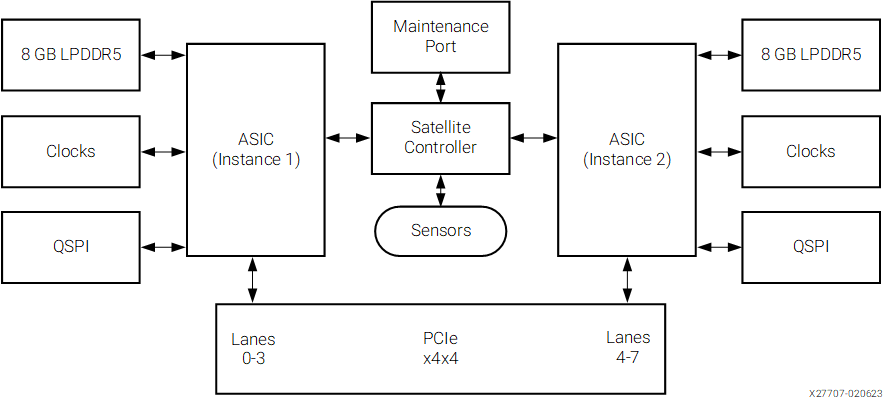
MA35D: 5 nm fixed ASIC, AV1, scaling and quality engines on-chip, lower cost per watt
Targeted at ML vision transcoding SaaS, CDN edge, cloud gaming, conferencing, markets and the OEMs building appliances
AMD Validated design is eight cards in a 1U for 256 channels.
The working stack
| Component | This deployment |
|---|
| Userspace | AlmaLinux 10.2 |
| Kernel | 6.12.0-124.56.5.el10_1.x86_64, pinned |
| SDK | AMD AMA SDK 1.5.0 |
| ZSP / SC firmware | 2.1.0 / 9.8.5 |
| Video tools | AMD-patched FFmpeg and mautil |
| |
Check the slots
BIOS :
- PCIe Gen4 x4x4 bifurcation on each MA35D slot.
- Above 4G Decoding and IOMMU enabled.
- Secure Boot disabled.
- Performance power profile.
Filter on the device ID; other Xilinx devices share vendor 10ee:
sudo lspci -nn -d 10ee:5070
sudo lspci -nn -d 10ee:5070 | wc -l
Two cards, four lines. If the count is wrong, investigate slot wiring, bifurcation, seating, and power
The kernel problem
AMA SDK 1.5.0 fails to build against the AlmaLinux 10.2 6.12.0-211.x.el10_2 kernels:
error: implicit declaration of function 'from_timer'; did you mean 'mod_timer'?
workaround
leave the 10.2 userspace in place and boot the newest 10.1 kernel from the AlmaLinux vault:
sudo tee /etc/yum.repos.d/almalinux-10.1-vault.repo >/dev/null <<'EOF_VAULT'
[vault-10.1-baseos]
name=AlmaLinux 10.1 Vault BaseOS
baseurl=https://vault.almalinux.org/10.1/BaseOS/$basearch/os/
enabled=0
gpgcheck=1
gpgkey=file:///etc/pki/rpm-gpg/RPM-GPG-KEY-AlmaLinux-10

[vault-10.1-appstream]
name=AlmaLinux 10.1 Vault AppStream
baseurl=https://vault.almalinux.org/10.1/AppStream/$basearch/os/
enabled=0
gpgcheck=1
gpgkey=file:///etc/pki/rpm-gpg/RPM-GPG-KEY-AlmaLinux-10
EOF_VAULT

sudo dnf --enablerepo='vault-10.1-*' --showduplicates list kernel-devel
  | grep el10_1 | awk '{print $2}' | sort -V | tail -n 3
The build used here is 6.12.0-124.56.5.el10_1. Install its six-package set:
V='6.12.0-124.56.5.el10_1'
sudo dnf --enablerepo='vault-10.1-*' install -y
  kernel-$V kernel-core-$V kernel-modules-$V kernel-modules-core-$V
  kernel-modules-extra-$V kernel-devel-$V
Leave the vault repos enabled=0; only the kernel comes from 10.1.
Boot configuration: IOMMU and HugePages
TARGET='6.12.0-124.56.5.el10_1.x86_64'
sudo grubby --update-kernel="/boot/vmlinuz-$TARGET"
  --remove-args='amd_iommu=on amd_iommu=off intel_iommu=on intel_iommu=off iommu=off'
sudo grubby --update-kernel="/boot/vmlinuz-$TARGET" --args='iommu=pt'
sudo grubby --set-default "/boot/vmlinuz-$TARGET"
amd_iommu=on is rejected by this kernel (AMD-Vi: Unknown option - 'on'); enable IOMMU in BIOS and use iommu=pt.
AMD’s HugePages sizing is 2,048 pages per VPU plus 96, using 2 MiB pages. One card needs 4,192 pages; two need 8,288, reserving about 16.2 GiB.
Check for an existing setting first. sysctl --system reads /etc/sysctl.d/ and then /etc/sysctl.conf, so a stale value in sysctl.conf silently wins.
grep -rn nr_hugepages /etc/sysctl.conf /etc/sysctl.d/
Remove any vm.nr_hugepages line from /etc/sysctl.conf (sudo sed -i '/^vm.nr_hugepages/d' /etc/sysctl.conf), then configure the two-card allocation:
sudo tee /etc/sysctl.d/90-ama-hugepages.conf >/dev/null <<'EOF_S'
# 2 cards x 2 VPUs x 2048 + 96, using 2 MiB pages
vm.nr_hugepages = 8288
EOF_S

sudo sysctl --system
sudo systemctl reboot
After reboot:
uname -r
# Expected: 6.12.0-124.56.5.el10_1.x86_64

grep -E 'HugePages_Total|Hugepagesize' /proc/meminfo
# Expected: 8288 pages, 2048 kB each

sudo dmesg | grep -i 'Default domain'
# Expected: Passthrough (set via kernel command line)
Build prereqs and kernel lock
sudo dnf install -y dnf-plugins-core epel-release 'dnf-command(versionlock)' unzip
sudo dnf config-manager --set-enabled crb
sudo dnf install -y dkms gcc make elfutils-libelf-devel

rpm -q "kernel-devel-$(uname -r)"
kernel-devel must match the running kernel exactly. Lock that package set:
rpm -qa 'kernel*' | grep -F "$(uname -r | sed 's/.x86_64$//')" |
  while read -r p; do sudo dnf versionlock add "$p"; done
sudo dnf versionlock list | grep kernel | sort -u
For this installation, expect six package names: kernel, kernel-core, kernel-devel, kernel-modules, kernel-modules-core, and kernel-modules-extra. From here on, dnf upgrade --exclude='kernel*'.
Install the SDK from local packages
AMD’s Registered Guest Resources page, look for ma35d_ama_sdk_1.5.0.zip under Video SDK.
The similarly named ma35d_ama_portal_1.5.0.zip is the GUI helper.
mkdir -p ~/ama-sdk
mv ~/ma35d_ama_sdk_1.5.0.zip ~/ama-sdk/
cd ~/ama-sdk
sha256sum ma35d_ama_sdk_1.5.0.zip
unzip -q ma35d_ama_sdk_1.5.0.zip
rpm -qp --qf '%{NAME}  %{VERSION}  %{RELEASE}n' 1.5.0/*.rpm
All six RPMs in our archive reported version 1.5.0_20260424092403, release 1. We installed five, leaving out the FFmpeg source package:
cd ~/ama-sdk/1.5.0
sudo dnf install -y
./amd-ama-firmware-*.x86_64.rpm./amd-ama-driver-*.x86_64.rpm
./amd-ama-core-*.x86_64.rpm./amd-ama-xma-*.x86_64.rpm
./amd-ama-ffmpeg-*.x86_64.rpm
Expect a EULA prompt even with -y. The bundled Install.txt starts with sudo dnf update; skip that step, it pulls a 10.2 kernel onto the host.
Check the DKMS build
The RPM transaction reports success even when the driver build fails. We found out when modprobe could not find the module.
dkms status
Expected for this build:
amd-ama-kmod/1.5.0, 6.12.0-124.56.5.el10_1.x86_64, x86_64: installed
added means the source is registered. It does not mean the module is installed for the running kernel.
To retry and expose the error:
sudo dkms build   amd-ama-kmod/1.5.0 -k "$(uname -r)"
sudo dkms install amd-ama-kmod/1.5.0 -k "$(uname -r)"
A from_timer error is the compatibility failure described above. Check the running kernel and matching headers before reinstalling the SDK.
Firmware update
New cards ship with old firmware the 1.5.0 driver rejects. new firmware ships with the SDK
sudo /opt/amd/ama/ma35/bin/mamgmt flash -d all
  -p /opt/amd/ama/ma35/firmware/ma35_firmware.bin
Flash Region: ZSP
  21:00.0   1.0.5  ->  2.1.0
  22:00.0   1.0.5  ->  2.1.0
  c1:00.0   1.0.5  ->  2.1.0
  c2:00.0   1.0.5  ->  2.1.0
Flash Region: SC
  22:00.0   9.7.10 ->  9.8.5
  c1:00.0   9.7.10 ->  9.8.5
Proceed with flashing operation? (yes/no)
Check the preview before answering: every endpoint in the ZSP table, one endpoint per card in the SC table. Which endpoint carries the SC varies by card. After successful completion:
sudo systemctl poweroff
Then power the host back on through the BMC. A warm reboot did not pick up the new firmware; it needs a full power cycle.
Verify the driver and firmware
sudo modprobe ama_transcoder
sudo lspci -nnk -d 10ee:5070
ls -l /dev/ama_transcoder*

for n in /sys/class/misc/ama_transcoder*/version_information; do
  echo "--- $n"
  cat "$n"
done
Each endpoint should show Kernel driver in use: transcoder. Our two-card host had /dev/ama_transcoder0 through /dev/ama_transcoder3, with these firmware fields:
ZSP Version = 2.1.0
SC Version = 9.8.5
eSecure Version = 1.0.0
PCIe FW Version = 2.1.0
Our nodes were created as crw-rw-rw-: world-readable and world-writable. Running the application as root does not restrict other users’ access. Review the device permissions and use a restricted service group and udev policy where appropriate.
Validate
source /opt/amd/ama/ma35/scripts/setup.sh
mautil examine
timeout 600 mautil validate -d all
echo "exit=$?"
On our host, examine listed four devices, two marked Primary Device. Validation must finish with every test passing and exit status 0. Run it before admitting production jobs: AMD warns that validation affects active pipelines.
Our results across the four devices:
| Test | Observed range |
|---|
| DMA write | 6,774–6,780 MB/s |
| DMA read | 7,022–7,027 MB/s |
| SC live | 194.6–197.8 fps |
| AV1 Type-1 | 177.3–178.1 fps |
| AV1 Type-2 | 182.7–183.9 fps |
| H.264 | 200.1–200.5 fps |
| HEVC | 199.9–200.0 fps |
It took 13 seconds on our host;
Make the SDK environment available in interactive login shells:
sudo tee /etc/profile.d/ama-sdk.sh >/dev/null <<'EOF_P'
if [ -n "${BASH_VERSION:-}" ] && [ -r /opt/amd/ama/ma35/scripts/setup.sh ]; then
    source /opt/amd/ama/ma35/scripts/setup.sh
fi
EOF_P
Test FFmpeg
With the SDK environment sourced, confirm the AMA codecs are present:
command -v ffmpeg
ffmpeg -hide_banner -encoders | grep -E '_amab'
ffmpeg -hide_banner -decoders | grep -E '_amab'
/opt/amd/ama/ma35/bin/ffmpeg
 V..... av1_ama              AV1 (codec av1)
 V..... h264_ama             H264 (codec h264)
 V..... hevc_ama             HEVC (codec hevc)
 V..... ljpeg_ama            LOSSLESS JPEG (yuv420p input only) (codec ljpeg)
 V..... jpeg_ama             JPEG (codec mjpeg)
 V..... av1_ama              AV1 (codec av1)
 V..... h264_ama             H264 (codec h264)
 V..... hevc_ama             HEVC (codec hevc)
 V..... jpeg_ama             JPEG (codec mjpeg)
 V..... vp9_ama              VP9 (codec vp9)
AMD’s build ships ffmpeg only, no ffprobe; ffmpeg -i file prints the same stream info.
Hardware decode, scale, and HEVC encode:
ffmpeg -nostdin
  -hwaccel ama -hwaccel_device /dev/ama_transcoder0
  -c:v h264_ama -i in_4k30.mp4
  -vf 'scaler_ama=outputs=1:out_res=(1920x1080)'
  -c:v hevc_ama -b:v 8M out.mp4
This checks that the pipeline runs and produces a playable file. Ours ran a 4K30 H.264 source to 1080p HEVC at 4.4× realtime, 264 fps, on one VPU.
Lock the SDK after validation
rpm -qa 'amd-ama-*' |
  while read -r p; do sudo dnf versionlock add "$p"; done
sudo dnf versionlock list | sort -u
For the package set used here, expect five SDK locks and six kernel locks. Verify the names and versions, not just the count.
Tests
Each VPU has four encoder engines in two pairs. One pair supports H.264, HEVC, and AV1 Type-2. The other is dedicated to AV1 Type-1. HEVC-only work cannot use the AV1-only pair. mautil reports the pairs as Encoder Type-2 and Type-1.
Realtime density
| Workload | Per VPU | Per card | Two-card host | AMD spec per card |
|---|
4K30 → 4K HEVC, medium | 4 | 8 | 16 | 8 |
1080p60 → HEVC, medium | 8 | 16 | 32 | 16 |
1080p60 → HEVC, -preset fast -bf 0 | 10 | 20 | 40 | 20 |
1080p60 → AV1 Type-1, medium | 8 | 16 | 32 | — |
| 1080p60 → HEVC + AV1 Type-1, equal split | 16 | 32 | 64 | 32 |
Every row matches AMD’s table.
Place the AV1 jobs on the intended engines
For the mixed workload, each VPU ran eight HEVC jobs and eight AV1 Type-1 jobs. av1_ama defaults to the multi-standard pair; select the AV1-only engines explicitly:
-c:v av1_ama -type 1
Options are listed by ffmpeg -hide_banner -h encoder=av1_ama.
Throughput
Same 1080p60 → HEVC medium test without -re, 8 streams per VPU flat out, 3 minutes: 2,784 fps aggregate, 1,392 fps per card, 696 fps per VPU. Type-2 encoders at 100%, decoder at 28%, host CPU at 0.3%.
Power
Board power per card, read from mautil examine -r electrical during each run:
| Workload | Streams per card | Card power |
|---|
4K30 HEVC, medium | 8 | 18 W |
1080p60 HEVC, medium | 16 | 18 W |
1080p60 HEVC, fast | 20 | 19 W |
| 1080p60 HEVC + AV1 Type-1 | 32 | 27–28 W |
MA35D vs NVIDIA L4
This project’s core idea was video capacity budgeted separately from inference. NVIDIA’s driver caps consumer/prosumer G-Force GPUs at 12 concurrent encode sessions per system.
The L4 is the datacenter SKU in this form factor: two NVENC, four NVDEC, 72 W TDP.
One card each, and AMD’s eight-per-1U design:
| MA35D × 1 | MA35D × 8 | L4 × 1 | L4 × 8 |
|---|
| Cards | $1,595 | $12,760 | $4,000 | $32,000 |
1080p60 realtime, HEVC medium | 16 | 128 | ~28 | ~224 |
1080p60 realtime, HEVC fast | 20 | 160 | — | — |
| 1080p60 realtime, HEVC + AV1 Type-1 | 32 | 256 | ~28 | ~224 |
| 4K30 realtime, HEVC | 8 | 64 | ~14 | ~112 |
| 1080p HEVC throughput | 1,392 fps | 11,100 fps | ~1,850 fps | ~14,800 fps |
| Single stream, 4K30 → 1080p60 HEVC | 264 fps | — | ~438 fps | — |
| Accelerator power, HEVC / mixed | 19 / 28 W | 152 / 224 W | ~55 W | ~440 W |
| Oversubscribed | Extra stream refused | | Every stream slows | |
| $ per HEVC 1080p60 stream | $100 | $100 | ~$143 | ~$143 |
| $ per mixed 1080p60 stream | $50 | $50 | ~$143 | ~$143 |
Three-year cost
Electricity = watts / 1000 × 26,280 h × $0.15/kWh × 1.5 PUE
| Per card | MA35D, HEVC | MA35D, HEVC + AV1 | L4, HEVC |
|---|
| Card | $1,595 | $1,595 | $4,000 |
| Power | 19 W | 28 W | 55 W est. |
| Electricity, 3 yr | $112 | $166 | $325 |
| Total | $1,707 | $1,761 | $4,325 |
| 1080p60 sessions | 16 | 32 | ~28 |
| Per session | $107 | $55 | ~$154 |
Electricity is under 10% of the total for either card at this rate. The decision is capex; the watts decide what a rack can hold.
References
- AMD, AMA SDK 1.5.0 Release Notes, supported kernels and distributions: https://amd.github.io/ama-sdk/latest/release_notes.html
- AMD, Alveo MA35D product page, use cases and 35 W typical: https://www.amd.com/en/products/accelerators/alveo/ma35d.html
- AMD, Alveo U30 media accelerator product brief (appliance positioning): https://www.amd.com/en/products/accelerators/alveo/u30/a-u30ma-p08g-pq-g.html
- AMD, MA35D launch press release, 32× 1080p60, 8 cards per 1U: https://www.amd.com/en/newsroom/press-releases/2023-4-6–amd-launches-first-5nm-asic-based-media-accelerat.html
- AMD, Getting Started with AMD AMA Video SDK Cards: https://amd.github.io/ama-sdk/latest/getting_started_on_prem.html
- AMD, Specs and Features, density definitions and tables: https://amd.github.io/ama-sdk/latest/specs_and_features.html
- AMD, Using FFmpeg, AV1
type and preset options: https://amd.github.io/ama-sdk/latest/using_ffmpeg.html
- AMD, Card Management, validation, identifiers, and electrical-report examples: https://amd.github.io/ama-sdk/latest/card_management.html
- NVIDIA, NVENC Application Note, Video Codec SDK 13.1, session limits and engine/clock scaling: https://docs.nvidia.com/video-technologies/video-codec-sdk/13.1/nvenc-application-note/index.html
- NVIDIA, L4 Product Specifications: https://www.nvidia.com/en-us/data-center/l4/
- Dell, PowerEdge R6615 configurator, L4 option pricing: https://www.dell.com/en-us/shop/dell-poweredge-servers/poweredge-r6615-rack-server/spd/poweredge-r6615/pe_r6615_tm_vi_vp_sb
- procps-ng, sysctl(8),
-system file precedence: https://man7.org/linux/man-pages/man8/sysctl.8.html
- Linux man-pages, inode(7), file permission bits: https://man7.org/linux/man-pages/man7/inode.7.html
